
Local-first quote and job app for AU & NZ tradies
From first quote to finished job.
Create quotes and estimates, send a clean PDF, turn accepted work into scheduled jobs, keep clients updated and record payment — without carrying a heavyweight CRM in your pocket.
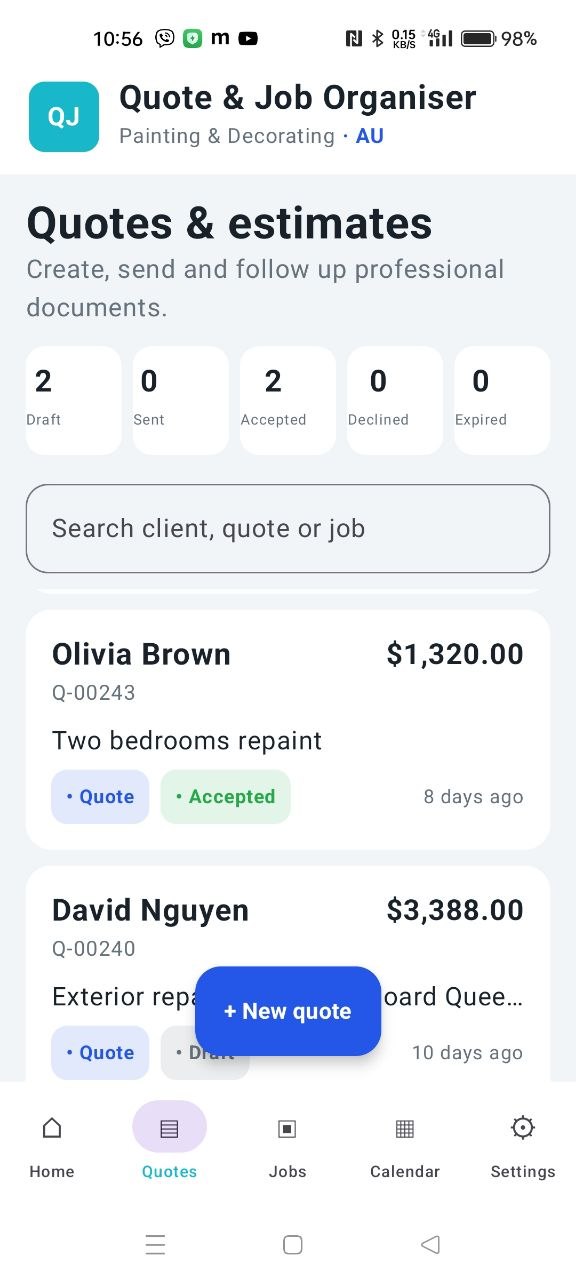
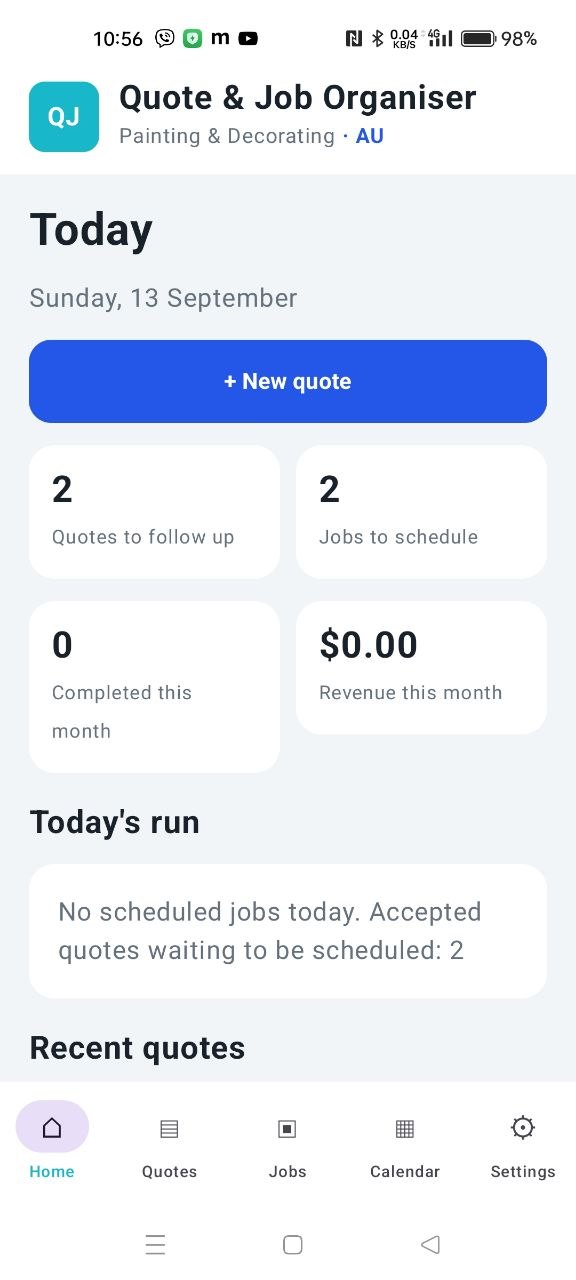
Built around the job, not the admin
A small app for the part of the day that creates work.
A quote is not an isolated document. It is the beginning of a real job. Quote & Job Organiser keeps that chain connected without demanding accounts, subscriptions or complicated setup.
Build the quote
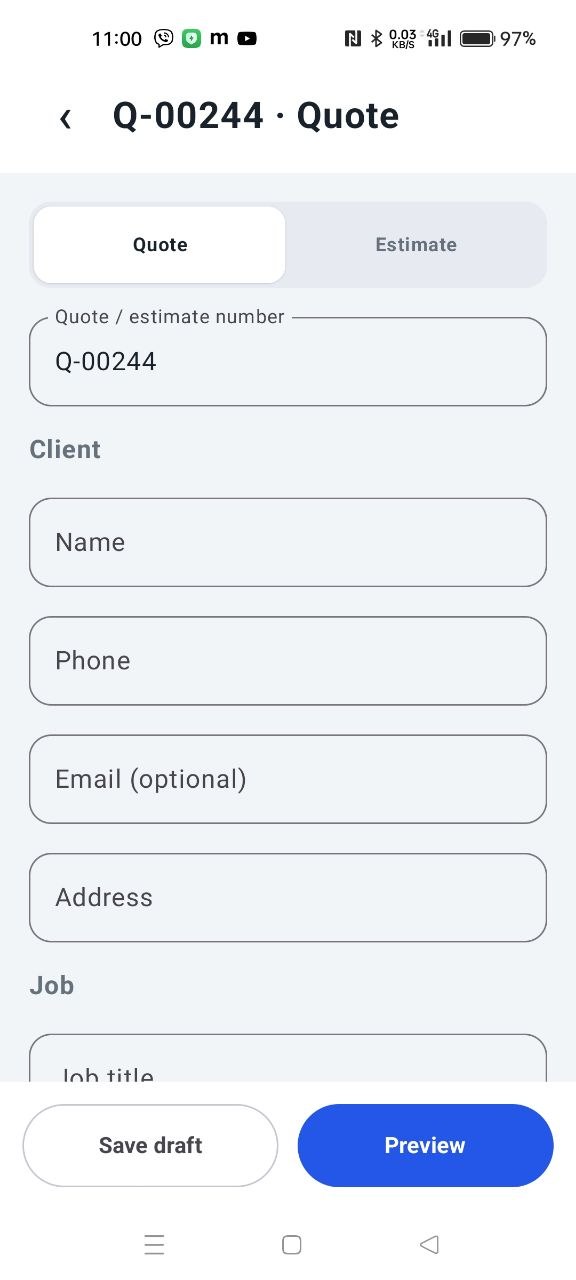
Add the client, scope, reusable services, quantities, prices, GST and terms. The next number is generated automatically and remains editable.
Send a real PDF
Preview the document and share it through the Android share menu, email, SMS or WhatsApp. The app does not send anything without your action.
Accept it once
Mark the quote accepted and the corresponding job appears automatically. The number, client, description and value stay connected.
Run the work
Schedule a date and time, open directions, call the client, attach job photos, keep private notes and send useful ETA or delay messages.
Close the loop
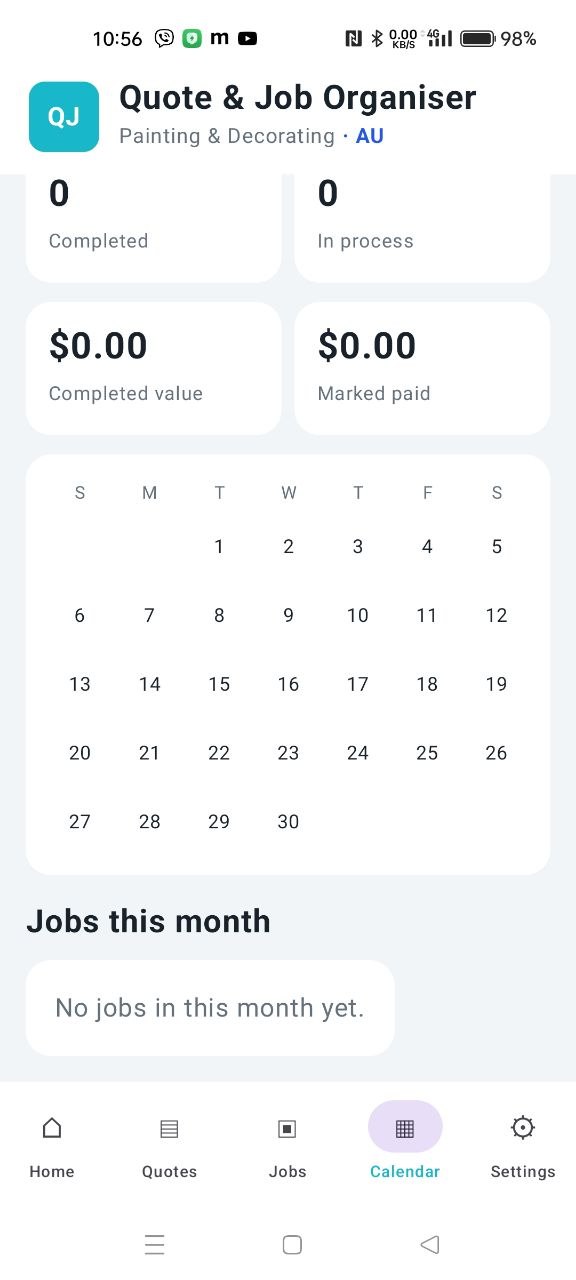
Complete the job, mark it paid and review monthly work and value in the calendar. Export a local backup whenever you choose.
Everything needed for the everyday workflow
Useful on the first job.
The interface is designed for a person using one hand on site — large actions, clear states, editable information and no hidden mandatory steps.
Quotes & estimates
Reusable items, custom work, quantities, taxes, totals, validity terms and editable document numbers.
Connected jobs
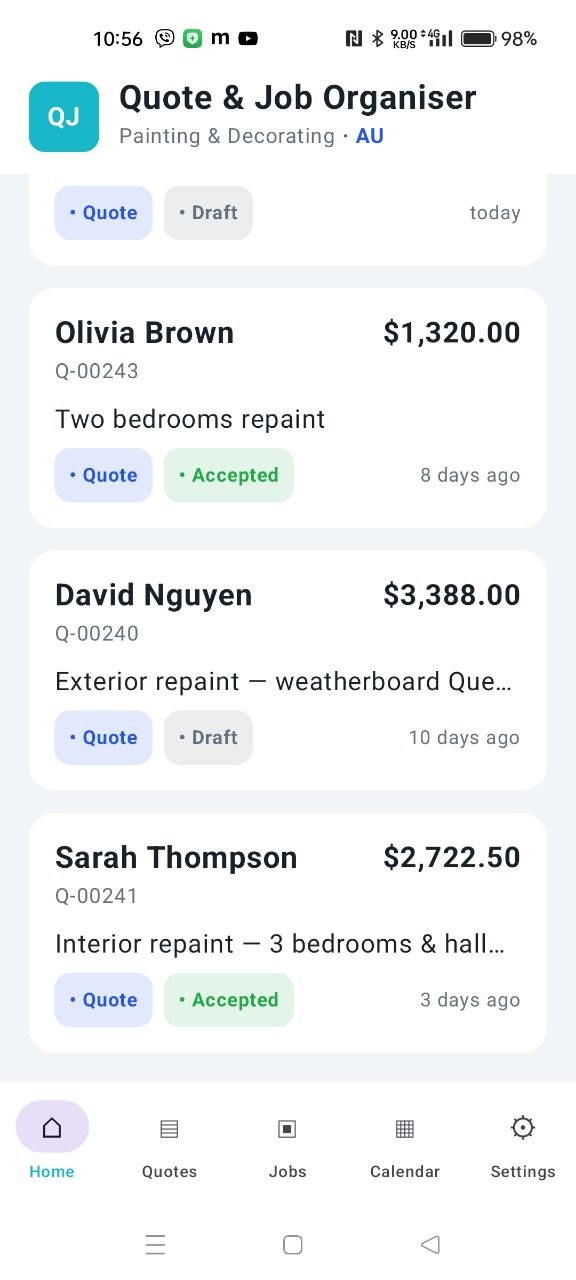
An accepted quote becomes a job without entering the client, description and value all over again.
Client updates
Prepare “finishing”, “on my way”, delay and cancellation messages with useful ETA information.
Photos & notes
Keep selected site photos and private working notes beside the job that they belong to.
Calendar & reporting
See scheduled jobs, work in process, completed value and what has been marked paid.
Local backup
Export and restore your records as a local file. There is no account and no cloud database in the current version.
Real app screens
No mock promises.
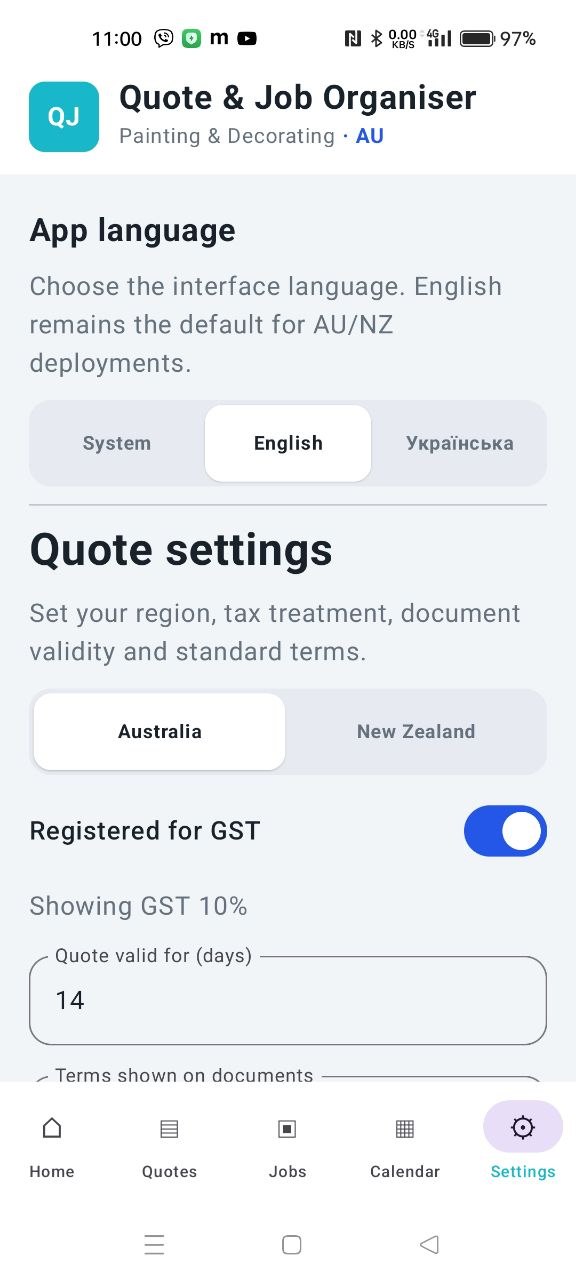
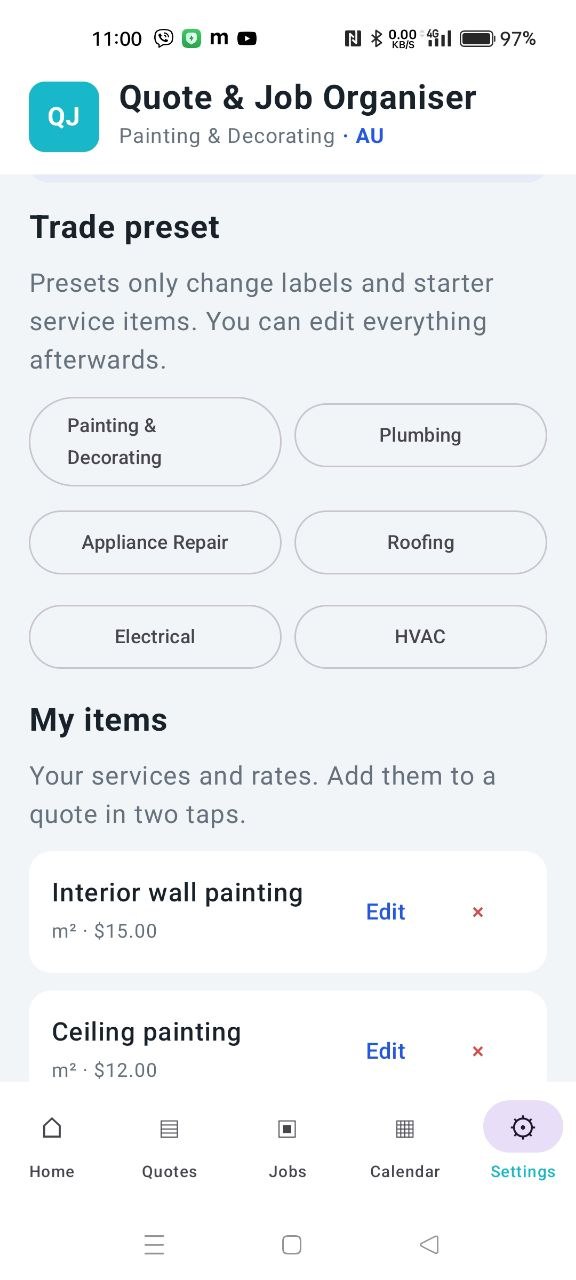
These are real screens from Quote & Job Organiser: the same interface you can install and explore.
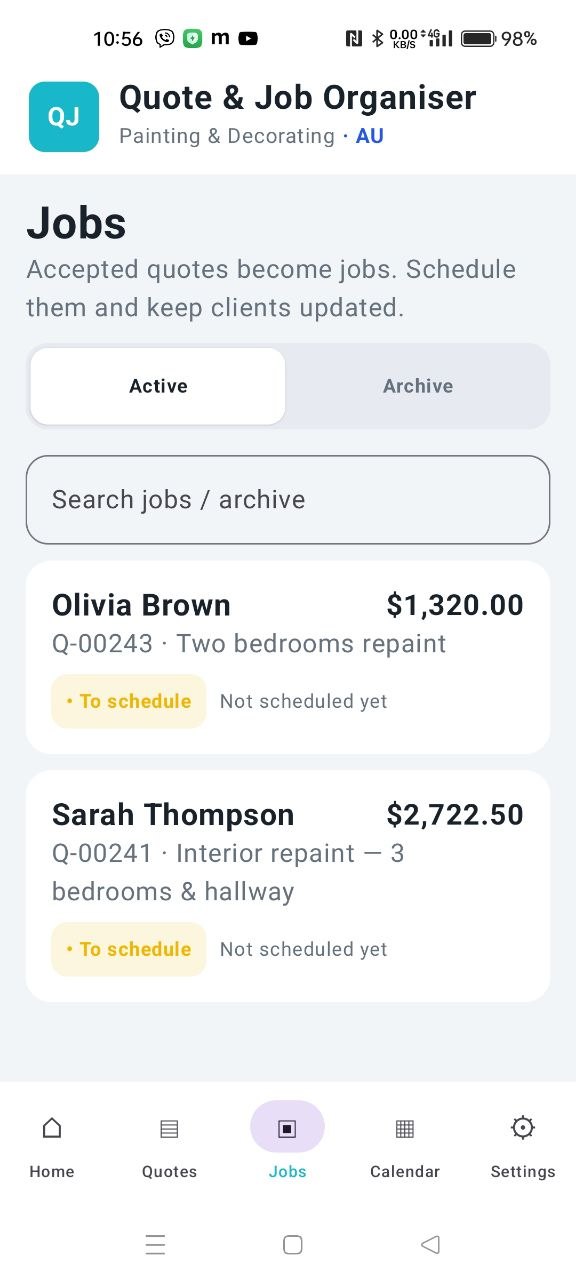
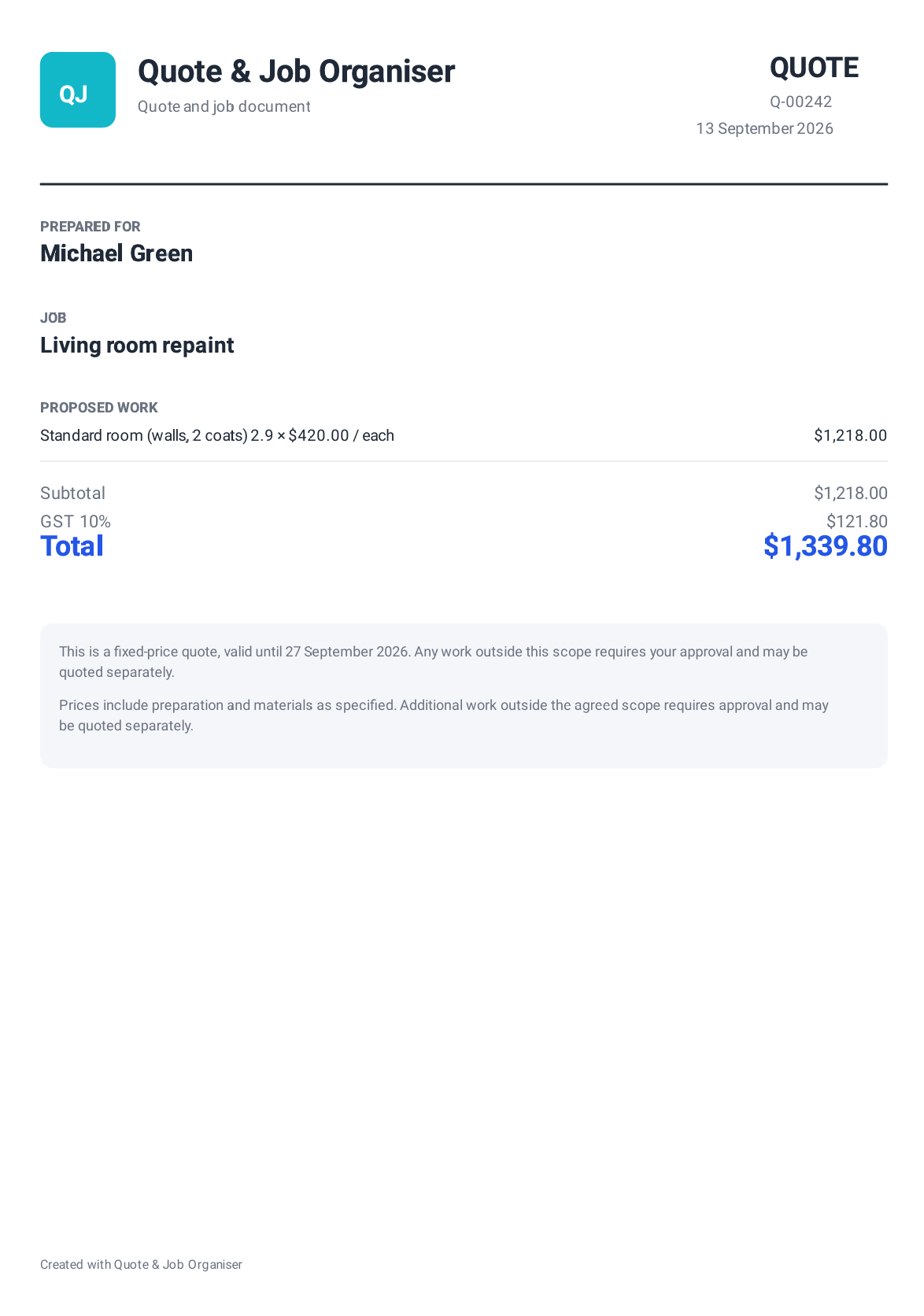
A document the client can understand
A quote that leaves the phone looking like a quote.
The app turns line items into a clean PDF with the customer, job, proposed work, subtotal, GST, total and terms presented in a practical order.
Personal app development for small business
Useful today. Built to become yours.
Maybe all you need is your logo on the PDF. Maybe your trade needs a completely different quotation method, new screens or a workflow nobody has packaged correctly before. Both are sensible starting points.
Some of the best improvements begin with one sentence: “Could the app also…?” We are happy to discuss ideas with independent tradies, sole operators and micro-businesses — not only large companies.
Tell us your ideaYour identity
App name, logo, icon, colours, business details, service area, registration information and client-facing wording.
Your PDF layout
Rebuild the header, sections, columns, tax presentation, deposits, signatures, exclusions, warranties and terms around your real quote.
Your way of working
Add or replace statuses, approvals, revisits, inspections, material stages, handovers, checklists and follow-up actions.
Entirely new sections
Equipment cards, room measurements, maintenance history, stock, recurring work, safety checks or another section unique to your trade.
Less repeated typing
Custom calculators, price rules, reusable packages, document numbering, message templates and field-specific recommendations.
Your country and language
Currency, GST/VAT, registration labels, date formats, terminology, conditions and additional interface languages.
A tailored app does not have to begin with an enterprise-sized project.
Start with the smallest change that creates real value: perhaps a logo and a better PDF, perhaps one specialist calculator. Or define a larger redesign with new navigation and complete trade-specific workflows. We scope the work around what your business actually needs, so a sole trader does not have to pay for the complexity of a national service company.
One core, many practical trades
For people who quote work and then have to deliver it.
Questions before the first quote
FAQ
The current release deliberately stays simple, local and transparent.
Is Quote & Job Organiser free?
The Google Play version is a fully working free app. It does not require an account, a server subscription or a monthly fee.
Where is my information stored?
Quotes, jobs, settings and related records are stored locally on your Android device. The current version does not automatically upload them to a developer-operated server.
Can I use it for my trade?
The app includes starter presets for several trades, and every saved service item can be added, edited or removed. You can also create custom line items inside a quote.
Can you put my logo and details on the PDF?
Yes. A private custom build can include your branding, registration details, services, messages and document layout. It can be a small branding task or part of a deeper redesign.
Can you add a function that is not in the app?
Yes. New screens, calculators, workflow stages, object records, reports and trade-specific features can be discussed individually. Even a very small idea is welcome.
Does the app send messages automatically?
No. It prepares useful text and opens the relevant app. You review and confirm the message or document before it is sent.
What happens if I change phones?
Use the Backup option to export a local JSON backup, move it securely to the new device and restore it there. You are responsible for keeping backup copies safe.
Start with the free app
Ready for your next quote?
Try the complete quote-to-job workflow on your Android phone.

Policies and user information
Privacy and terms
Privacy Policy — Quote & Job Organiser
Last updated: 13 September 2026
Quote & Job Organiser is provided and developed by Seo4.co.nz. This Privacy Policy explains how the Android application handles information.
1. No account and no developer-operated cloud database
The app does not require account registration. In normal use, quotes, estimates, client details, jobs, schedules, service items, prices, notes, payment status and app settings are stored locally on the user’s device. The current version does not automatically transmit this operational information to Seo4.co.nz.
2. Information entered by the user
Users may enter client names, phone numbers, email addresses, job addresses, job descriptions, prices, notes and other information needed to prepare quotes and manage work. The user is responsible for having an appropriate reason or permission to store client information on the device.
3. Photos and files selected by the user
The app may allow the user to select job photos and backup files through Android’s system file picker. Access is limited to items the user chooses. Selected file references may remain available to the app so that photos can be displayed with the relevant job.
4. PDF documents, messages and user-initiated sharing
PDF documents are generated on the device. When a user chooses to share a PDF, backup or prepared message through Android, email, SMS, WhatsApp or another application, the selected third-party service receives the information at the user’s direction. Those services operate under their own terms and privacy practices. The app does not send documents or messages automatically.
5. Backup and restore
The user may export a local JSON backup and choose where to store or share it. Seo4.co.nz does not automatically receive or retain that backup. Users should protect backup files because they may contain client and commercial information.
6. Analytics, advertising and sale of data
The current version does not include advertising, a developer-operated analytics service or the sale of user data. If this changes in a future release, this policy and the Google Play Data safety information will be updated before the changed processing is introduced.
7. Data retention and deletion
Locally stored data remains on the device until it is removed through available app controls, Android app-data controls or by uninstalling the app. Backup files remain wherever the user chose to save them and must be deleted separately by the user. Because the app has no user accounts, there is no remote app account to delete.
8. Security
The app relies on Android’s application storage and system file-sharing mechanisms. No storage method can guarantee absolute security. Users should protect their device with an appropriate screen lock, keep Android updated and store exported backups securely.
9. External links and direct contact
The app and this page may link to Google Play, Seo4.co.nz, mapping services or communication applications. External services have their own privacy policies. If a user voluntarily contacts us, the submitted contact details and message may be used to respond, provide support or discuss requested development work.
10. Children
Quote & Job Organiser is a business productivity application and is not directed to children under 13.
11. Changes to this policy
This Privacy Policy may be updated when the app’s functions or data practices change. The latest version will be published on this page with a revised update date.
12. Privacy contact
Questions about this Privacy Policy may be sent to seo4conz@gmail.com.
Terms of Use — Quote & Job Organiser
Last updated: 13 September 2026
By installing or using Quote & Job Organiser, you agree to these Terms of Use. If you do not agree, do not use the application.
1. Purpose of the app
The app is a productivity tool for preparing quotes and estimates, organising jobs, recording work information and preparing client communications. It is not accounting, legal, tax, safety, engineering or regulatory-compliance advice.
2. User responsibility
You are responsible for checking all client details, descriptions, quantities, prices, tax treatment, totals, dates, terms and messages before using or sending them. You are also responsible for complying with applicable laws, licence conditions, tax rules, record-keeping duties and professional requirements.
3. Quotes, estimates and commercial agreements
The app helps users prepare documents but does not determine whether a quote, estimate, acceptance or other communication forms a legally binding agreement. Users should obtain appropriate professional advice for their own terms and business practices where necessary.
4. Local data and backups
The current version stores operational data locally. You are responsible for maintaining secure backups and for verifying that a backup can be restored. The developer is not responsible for data loss caused by device failure, loss, reset, uninstalling the app, operating-system changes or failure to maintain backups.
5. Third-party services
Phone, maps, SMS, WhatsApp, email, file storage and other external functions are provided by third parties. Their availability and behaviour are outside the developer’s control and may be subject to separate terms, charges and privacy policies.
6. Availability and warranty
The app is provided on an “as is” and “as available” basis to the extent permitted by law. The developer does not guarantee uninterrupted operation, compatibility with every device or suitability for every trade or commercial purpose.
7. Updates
The developer may update, change or discontinue features to improve the app, maintain compatibility, address security issues or respond to platform requirements. Users should install available updates and review important release information.
8. Custom development
Requests for branding, personalised documents, new screens, workflow changes or other development are separate services. Their scope, price, delivery method, support and ownership terms must be agreed directly in writing before work begins. Descriptions on this page are examples of what may be technically possible, not a promise that every request will be accepted.
9. Contact
Questions about these Terms may be sent to seo4conz@gmail.com.